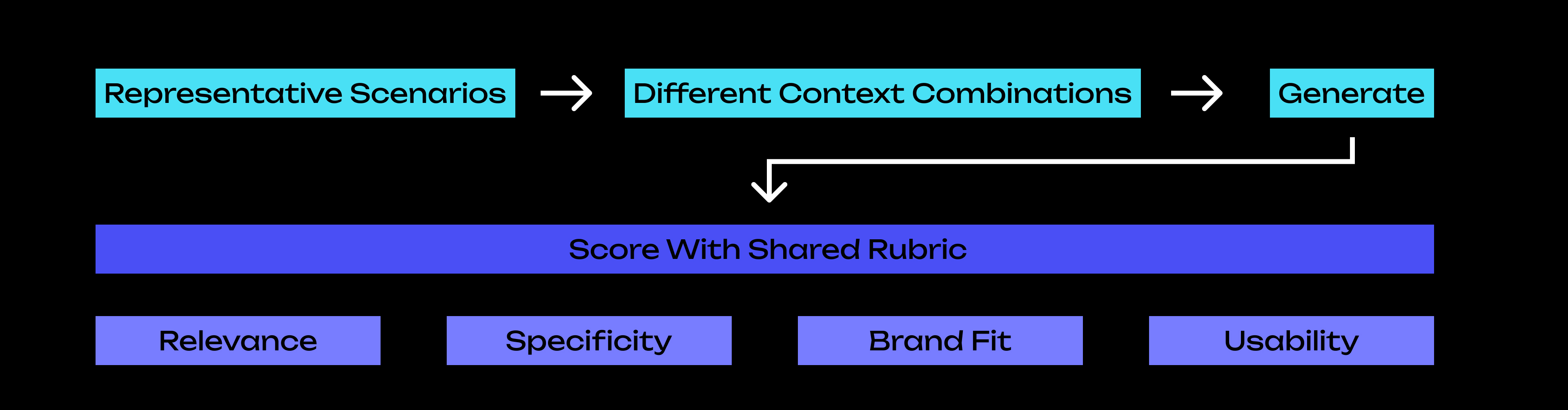
Designing how AI and designers collaborate to build products

Role

Design Lead
Design Engineer

Time

2026-present

Impacts

Vicino moved fast with AI, but the early prototype lacked the structure needed to scale.

I helped turn fragmented screens, generic AI interactions, and one-off implementation into a more coherent product foundation.

The Shift

From isolated AI outputs
to a connected product system.

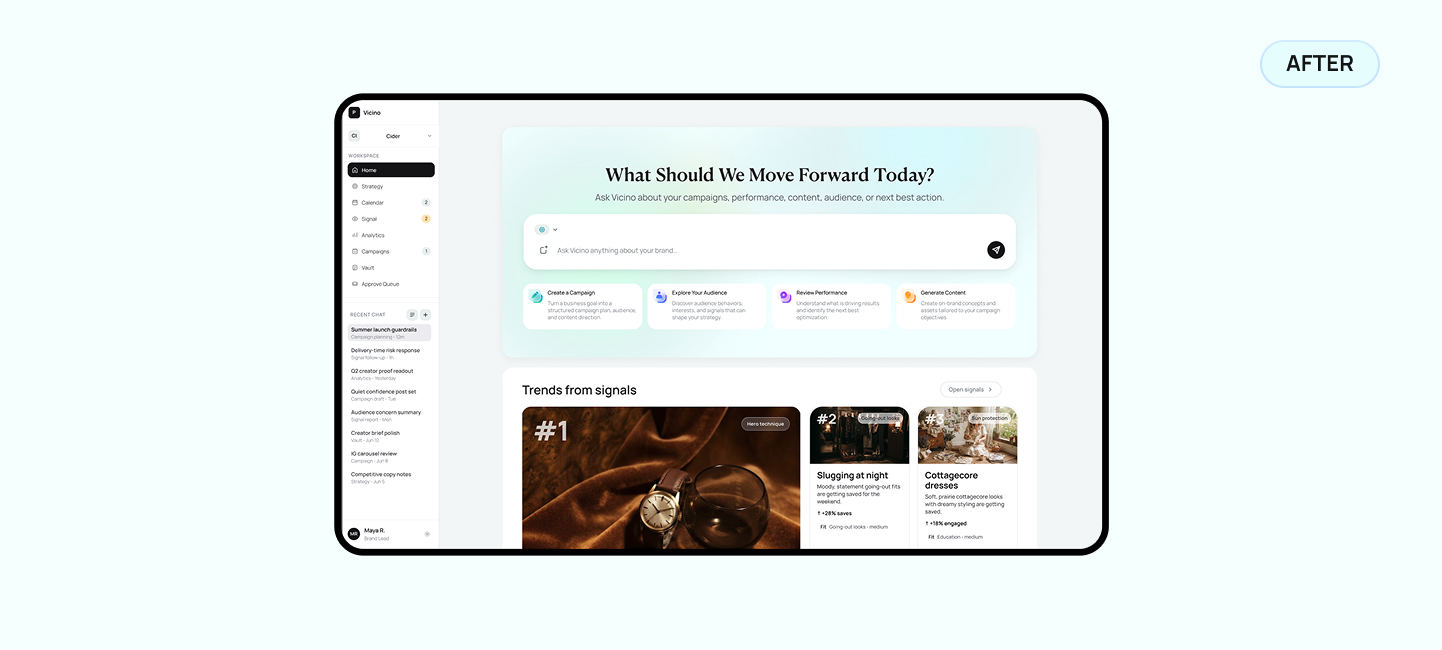
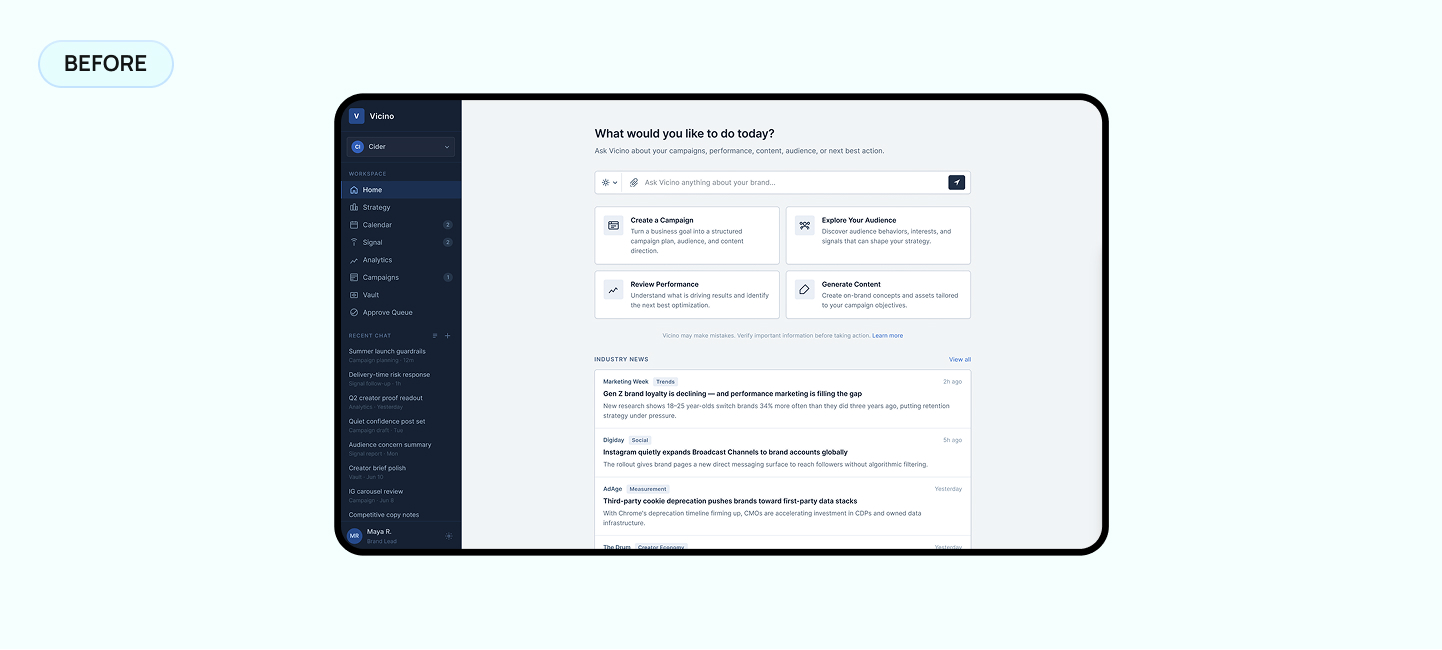
Image comparison slider. Before: Earlier Vicino prototype interface. After: Redesigned Vicino product interface. Drag or use arrow keys to compare.Redesigned Vicino product interface
Before
After

Slide to view the before-and-after difference.

Context

What is Vicino?

Vicino is an AI-native marketing platform that helps teams turn brand context, campaign goals, and business signals into structured marketing intelligence. My work focused on transforming an early vibe-coded prototype into a scalable MVP foundation.
Vicino product overview

There and here

From AI demo to product system

Before the redesign, the prototype helped the team move fast, but it lacked the structure needed to scale: fragmented UI patterns, an overly generic AI interaction, and one-off frontend implementation.

I worked across product design and frontend-aware implementation to rebuild the MVP foundation, define reusable UI patterns, and design the first AI-led onboarding workflow.
Fast Iteration
Consistency
Quality

Designing the Product Loop

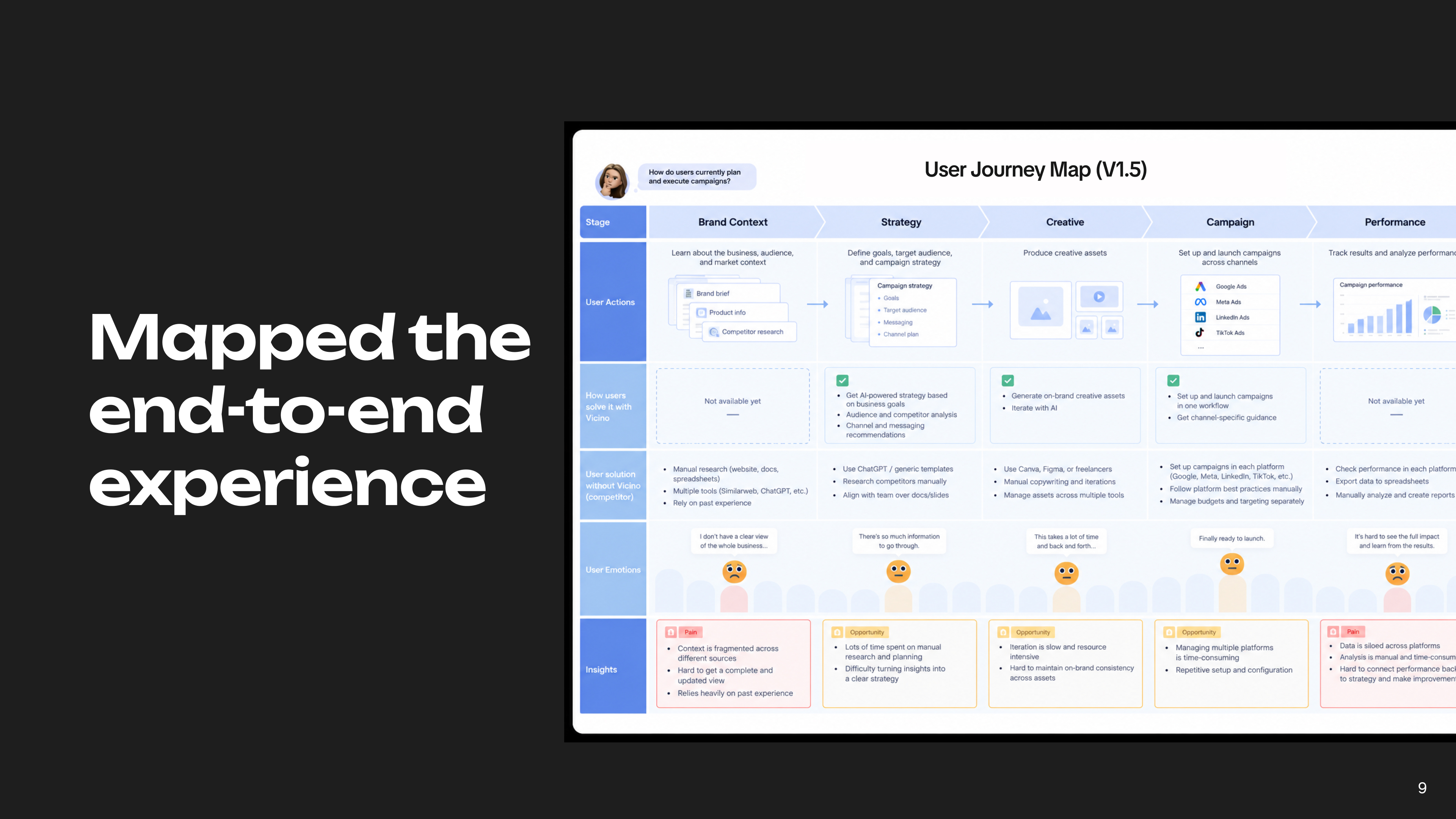
From business context to coordinated execution

Vicino was not designed as another AI content generator.

I defined a connected system where the product learns the business, recommends a direction, turns strategy into campaigns, and uses performance signals to improve what happens next.

Image comparison slider. Before: Earlier Vicino prototype interface. After: Redesigned Vicino product interface. Drag or use arrow keys to compare.Redesigned Vicino product interface
Before
After

Slide to view the before-and-after difference.

Onboarding

From blank chat to shared understanding

A generic chatbot asks users to know what to say.

I designed a guided intake that collects business context, adapts its questions, and lets users confirm what the AI has learned.

The result is not just a completed conversation. It is structured context the rest of the product can use.

Strategy

From AI output to clear priorities

AI can generate endless recommendations. The harder problem is helping teams decide what matters now.

I shaped Strategy as a decision layer—grounding recommendations in business context, explaining why they matter, and turning approved direction into action.

Campaigns

From strategy to controlled production

Generating content was not the hardest part.

The challenge was preventing teams from moving quickly in the wrong direction.

I designed Campaigns around clear decision gates—aligning on the objective, approving the brief, generating assets, and reviewing quality before anything moves forward.

Analytics

From performance reporting to next-best action

Most analytics tools explain what happened.

I positioned Analytics to help teams understand why it happened, what requires attention, and what the system recommends next.

Performance signals feed back into Strategy and future Campaigns.

Design Engineering

From Fragmented Prototypes to a Shared Foundation

The team explored the product across different design and AI prototyping tools.

As design lead, I helped align these separate outputs around shared interface patterns, design rules, and a more consistent product structure.
Design Canvas

visual frame

no reusable code

AI Page Builder

generated layout

inline styles

Model Chat

code snippet

hard to maintain

Image Composite

static screens

no interaction

Shared Foundation

Tokens
Components
Patterns
Frontend structure

Different sources. One product foundation.

System Consistency

Similar Screens Were Not Yet One System

The prototypes looked visually related, but repeated patterns used different structures, states, and implementation logic.

We began consolidating these decisions into reusable components and shared conventions.

Looked consistent

risk
status
Different structureDifferent statesOne-off styling

Built as a system

Header
Content
Status
Action
Shared CardShared ButtonShared StatusShared Interaction

Visual similarity was not enough. The structure had to become reusable.

AI-Readable Design

We Taught AI How We Design

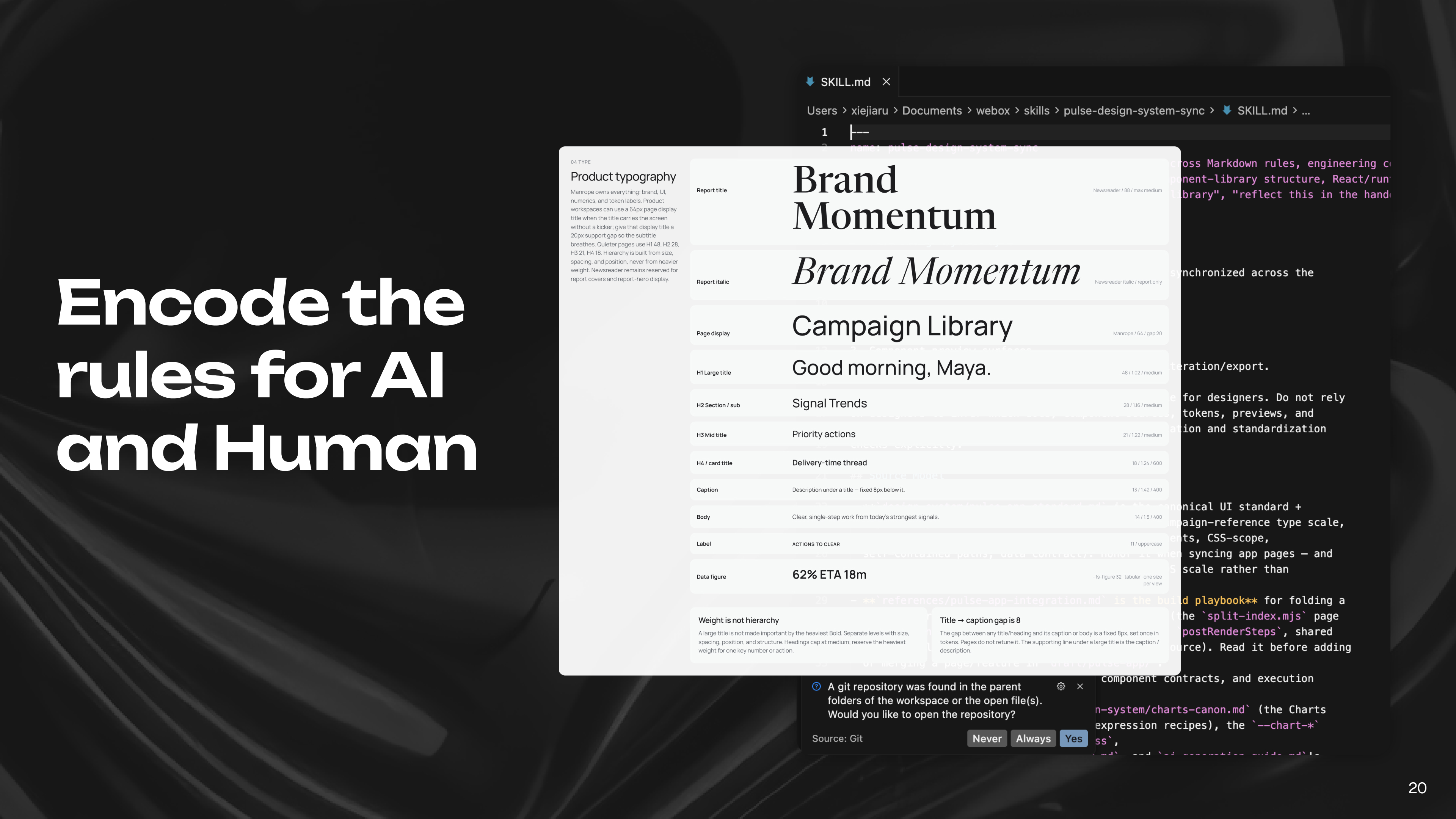
Prompting AI from scratch produced fast but inconsistent results.

I helped translate our visual principles, component patterns, and layout rules into reusable guidance that AI tools could follow.
Ad-hoc prompting

Prompt

Generate

Inconsistent output

Re-type rules every time

AI-readable system

AI Skill Loads

PrinciplesComponentsLayoutConstraintsExamples

Generate

guided by shared rules

On-system output

The rules live with the product, not inside a one-off prompt.

Design System

From One-Off Generation to Reusable Patterns

Instead of treating every AI-generated screen as a new design, we identified recurring patterns across chat, reports, cards, and navigation.

These patterns gave future workflows a more consistent starting point.

Chat message

Report section

Recommendation card

Navigation item

Identify
Normalize
Componentize

Chat/

Structure

States

Usage

Report/

Structure

States

Usage

Card/

Structure

States

Usage

Navigation/

Structure

States

Usage

Applied to

OnboardingStrategyCampaignsAnalytics

Recurring product decisions became reusable starting points.

Coded Prototypes

Code Made Product Decisions More Visible

Static screens could not fully show interaction states, responsive behavior, or implementation constraints.

Working with coded prototypes helped the team evaluate these decisions earlier and connect design more closely with the MVP.

01

Design Intent

  • static frame
  • basic layout
  • incomplete states

02

Reusable Pattern

  • component structure
  • variant states
  • responsive rules

03

Runnable Prototype

  • clickable
  • responsive
  • real content
  • recordable

expand · hover · responsive · once

Click. Test. Record. Learn.

Click. Test. Record. Learn.

My Role

Setting Direction While Working Hands-On

As design lead, I connected product design, shared system decisions, and implementation-aware prototyping.

I set the quality direction, reviewed work across the team, and contributed directly to the core product experience and design foundation.

Inputs

Product vision

Founder feedback

Engineering constraints

Design Lead

Set Direction
Work Hands-On
FoundersDesign TeamEngineering

Outputs

Product model

Design standards

Core workflows

Reusable patterns

Prototype quality

Team loop

Define
Review
Align
Build

Connecting product direction, design quality, and implementation.

Design engineering

Designing with implementation in mind

Because the MVP was being built quickly, I translated design decisions into reusable frontend patterns instead of one-off screens. This helped reduce the gap between Figma and implementation.